How to model a 3D character with AI in 2026
Social media is full of “I made a whole game with one prompt, 100% procedural, in two hours”. I have been building Kite Rider with AI for a while, without writing a single line of code, and I can tell you it doesn’t work like that.
The main character alone, a kid hanging from a hang glider, took me five attempts with four different models before I got one I liked. Same character, same low poly style, same game viewer, same light and same framing. The only things that change are who does the modelling and the context I give it.
| # | Who | What I give it | How | Triangles |
|---|---|---|---|---|
| 1 | Fable 5 (high) | written description | code | 3,020 |
| 2 | Fable 5 (high) | + the image + feedback | code | 3,432 |
| 3 | GPT-5.6 (high) | image + its own description | code | 1,950 |
| 4 | Claude Opus 5 (extra effort) | image + description | code | 2,348 |
| 5 | Fable 5.1 | image + Blender over MCP | tool | 1,191 |
Here is the whole process, attempt by attempt, so you can avoid the mistakes I made.
ChatGPT does the artwork
I'm more of a Claude person, but its models don't generate images. So the starting point comes from ChatGPT: the kid from the front, from the side and from above.This part was quick. A good result on the first try and one round of feedback to adjust it. It is the cheap part of the process (AI has been getting better at images for years) and also the most important one, because it is the reference for everything else.
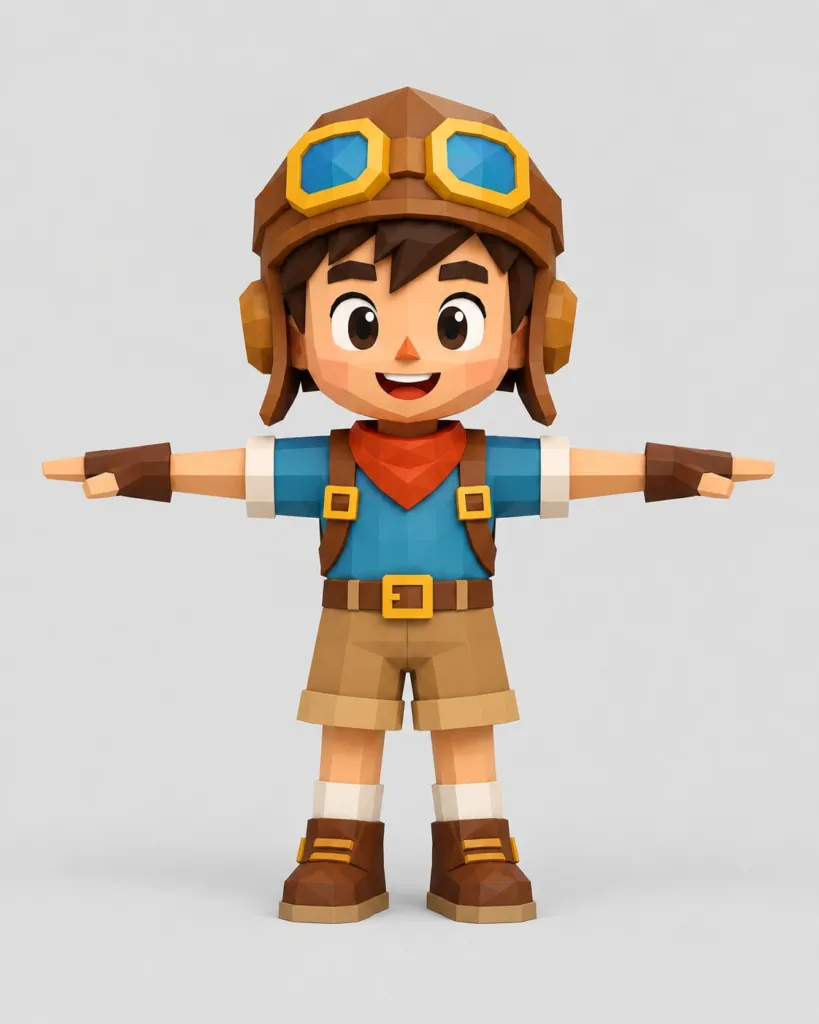
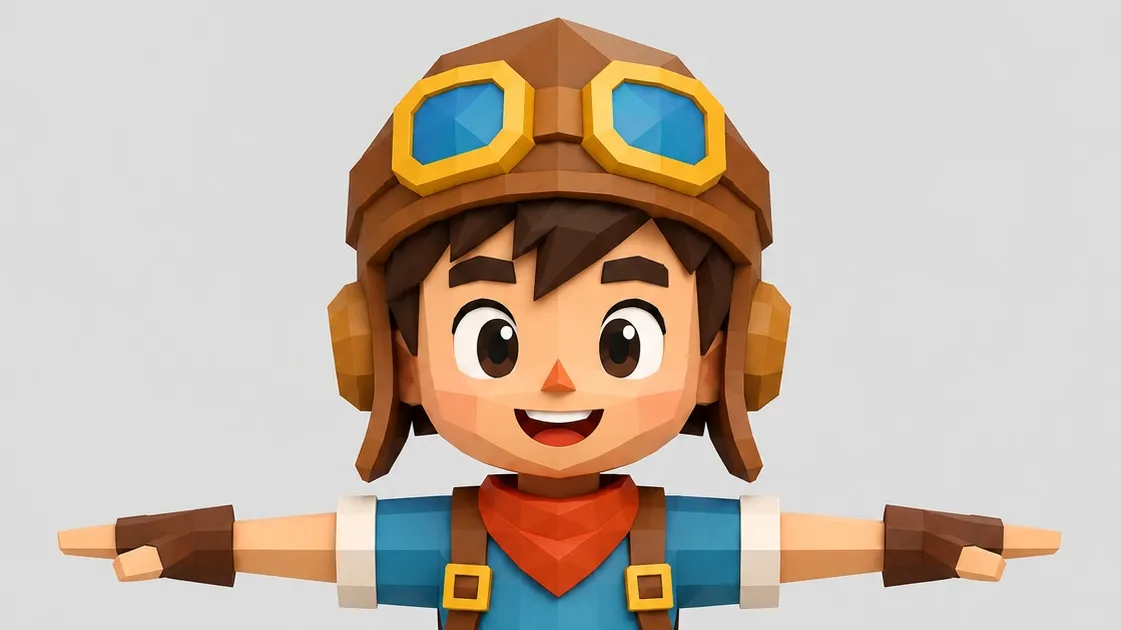
The target. This is where we need to get to.
What does change the result is exactly what you ask for. If you use the image as inspiration (“make me something like this”), the AI fills the gaps with its own assumptions about how things look: how long an arm is, what a helmet looks like, where the eyes go. If you tell it that the image is the reference it has to stick to, it stops making things up.
And a trick that has been very useful to me: ask ChatGPT to describe its own image so it can be modelled in 3D, instead of asking it to model it. With another character in the game it gave me 23,367 characters in 59 seconds: normalised proportions, hex colours, a coordinate map titled “for a parametric modeller or an AI”, and fourteen things not to do, which were exactly the fourteen mistakes the other AI was going to make on its own. That description goes into attempts 2, 3 and 4.
Attempt 1: Fable 5, blind
I give it only the written description. No image. And I ask for what I had been doing with every asset in the game: that it writes the code that builds the mesh, 100% procedural, without touching any 3D program.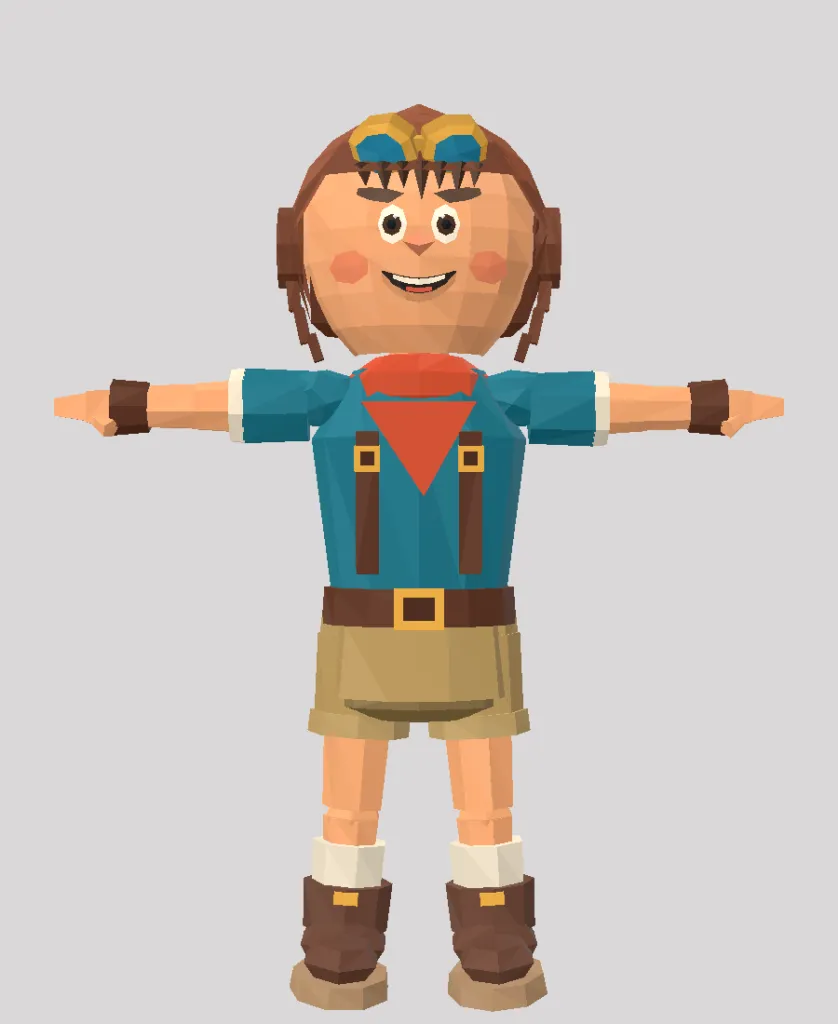
Attempt 1: ~3k triangles, from the text alone.
What comes out is a recognisable figure. The helmet, the goggles, the braces and the boots are all there, so the description works. But I expected more: the goggles look like a toy, tilt down and are half melted into the helmet. The helmet looks more like hair stuck to the skull, with an earpiece on each side, and the head is a ball. The body proportions are quite right; they were in the description.
Attempt 2: the same model, with the image in front of it
I stay in the same conversation. I give it feedback and, this time, the reference image.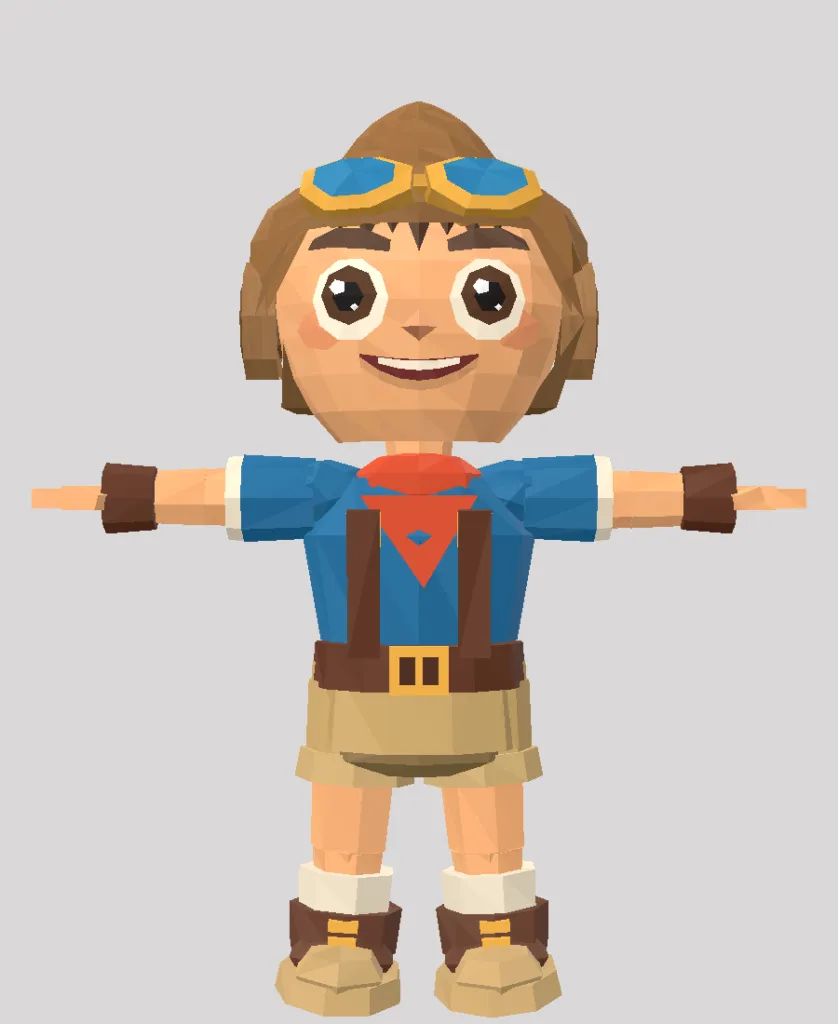
Attempt 2: 3,432 triangles. The head changes, and with it the whole character.
The jump is big. You see it most in the head, but in the whole body too: the length of the arms, the width of the torso, where the eye line falls. None of that was in the text. It is information encoded in the image. That is why it matters so much to pass it on.
And Claude knows how to use it without being told. It zooms into parts of the image and lays a grid on top to measure instead of guessing by eye, and checks that the proportions fit. Counting sections, tips and facets before building is worth more than any parameter tweak afterwards.
Some numbers: head and helmet take up 41% of the total height, the eyes 0.24 of the face width. It is 3,432 triangles, and Claude sets up 37 automatic checks to make sure the proportions don’t drift.
Not bad for procedural. This is the model that stayed in the game for a couple of weeks.
Attempt 3: ChatGPT builds from its own description
Since both the image and the description were its own, I wanted to see how it did at modelling. So I gave everything to GPT-5.6 on high effort.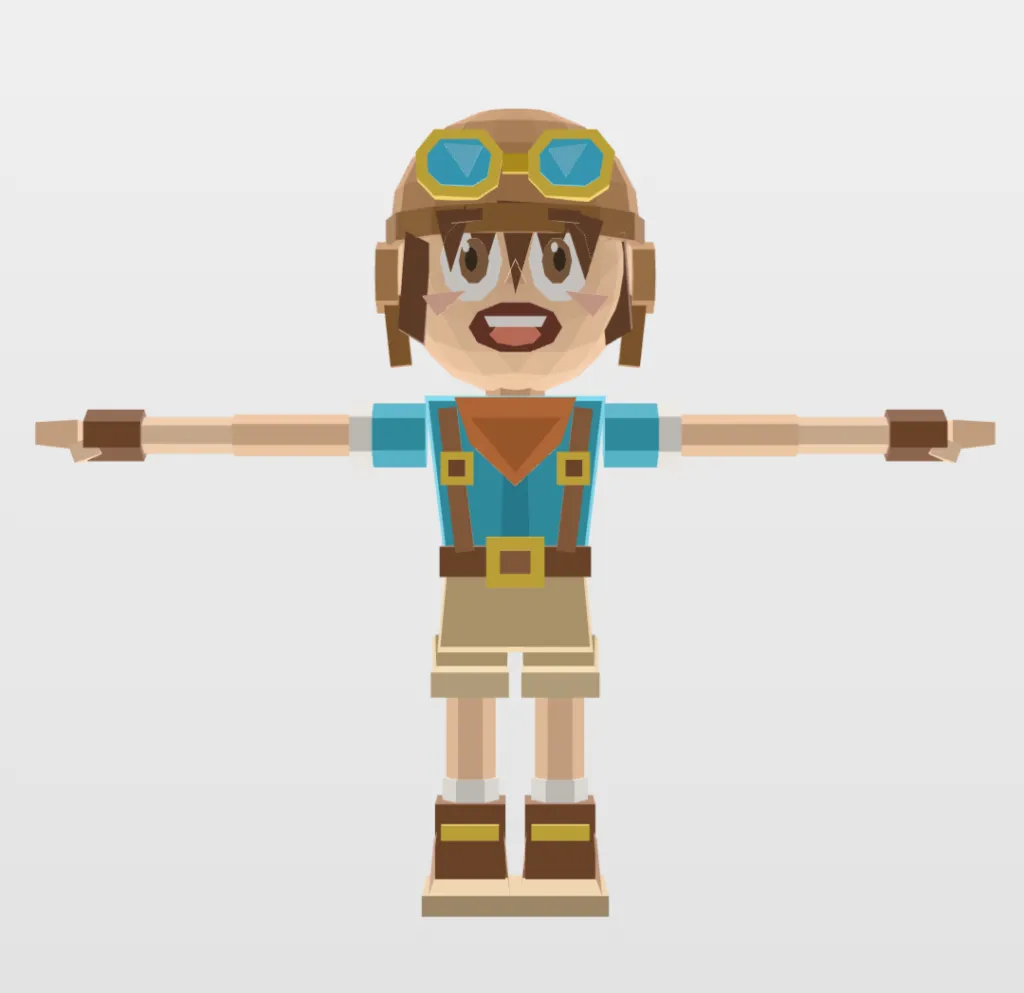
Attempt 3: 1,950 triangles, and the face gets lost along the way.
IMHO it is the worst of the five. It keeps many fine details (the buckle on the braces is there), but the face is terrible and it ignores the proportions: a flat face, blank eyes crossed by strands of hair and the blush on the cheeks, arms out of proportion and feet stuck together.
It’s not the first time this happens to me. With another character in the game it focused only on the face and spent ~3k triangles on a horrible bust that didn’t look anything like the reference.
If one thing is clear to me after this attempt, it is that ChatGPT (GPT-5.6 Sol) is very good at generating and reading images, but building a 3D model procedurally is not its thing, for now.
Attempt 4: Claude Opus 5 with extra effort
Same material, image and description, same procedural approach.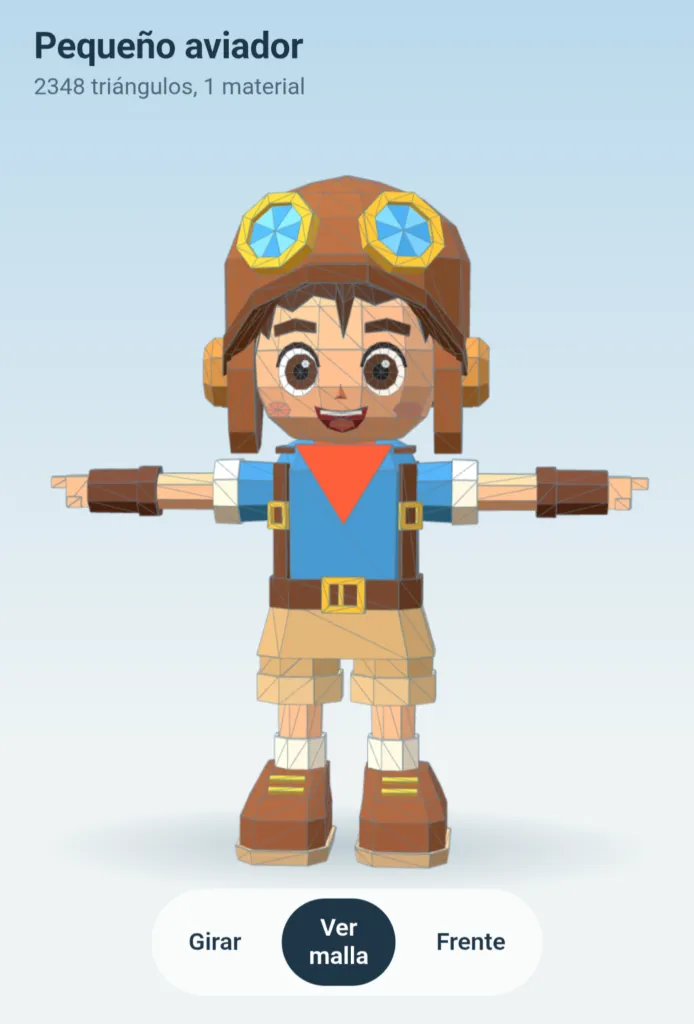
Attempt 4: 2,348 triangles on the first try.
2,348 triangles and a decent model on the first try, without a single round of feedback. I really like this one: the face holds up, the proportions hold up and the helmet finally looks like a helmet. If I have to find a flaw, it is the area around the neck and the scarf, but honestly it surprised me.
Here the extra effort is worth it, and it shows. It is the same task as attempt 2, with the image as the reference, and the difference is how much the model thinks before it starts writing. I did this one straight from Claude on the web (outside my VPS), and on its own it built me a great viewer to look at the model from different angles.
I have to admit I even wondered whether Claude was trying out a more advanced model here. It hasn’t modelled other characters this well for me, although that may be because this one is simpler or more typical (the big-headed kid, very Pixar style).
Attempt 5: Blender over MCP
I had read quite a lot about this idea lately, so I wanted to try it. Here the nature of the work changes. Fable 5.1 drives the 3D modelling program Blender through an MCP server: the AI doesn't write the mesh vertex by vertex, it uses the program the way a 3D artist would. Since my expectations are high, I go hard and add a constraint I hadn't used before: a budget of 1,000 triangles.And it doesn’t disappoint. The first result is already very decent, although not at the level of the previous one (the price of the triangle limit).
After a few rounds of my corrections (bigger eyes, a longer face, a stronger jaw, blush), the final model is 1,191 triangles (it asked for permission to go over the budget), 74 objects in the .blend, 25 flat colours, not a single texture and an 85 KB GLB. Half the geometry of the Opus extra one, with almost no loss in quality.
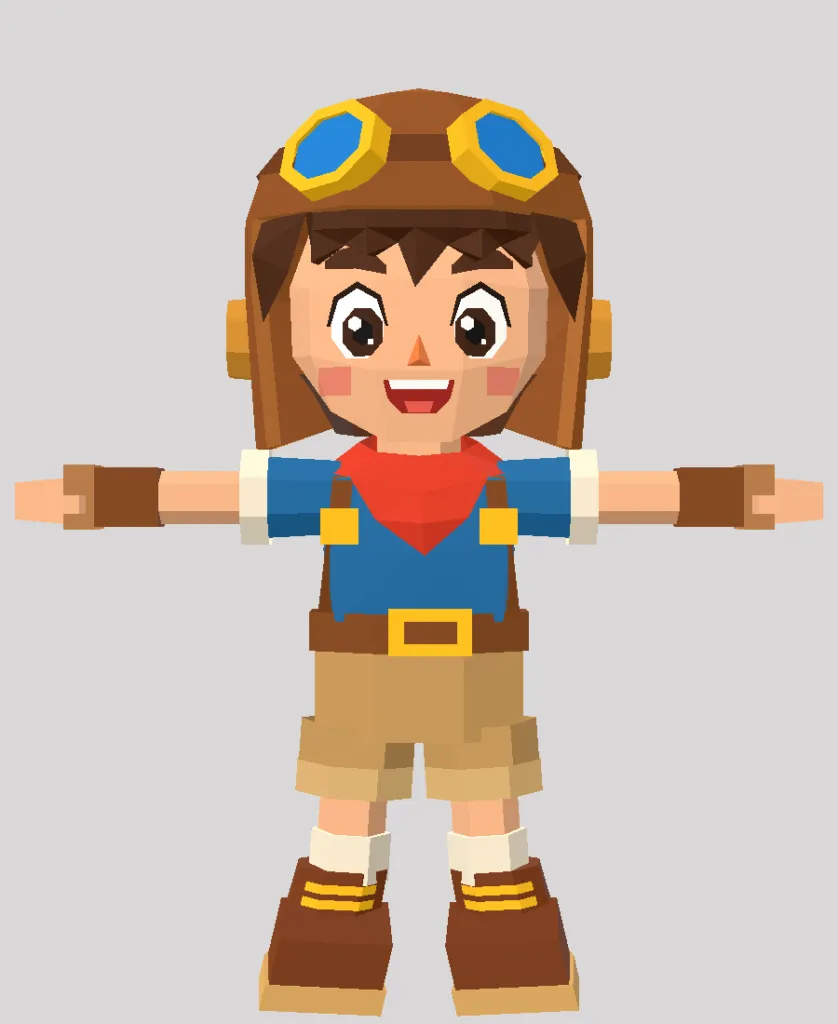
Attempt 5: 1,191 triangles, 65% fewer than the one I had in the game.
The final split, in case it helps as a reference: head 567, torso 176, upper arm 38 (×2), forearm 54 (×2), thigh 46 (×2), calf 86 (×2). The face takes half the budget, and that is how it should be.
My winners
Fable 5.1 driving Blender wins. Closely followed by Opus 5 with extra effort, which with this character comes very close, and without asking me for anything.The gap opens with complex models. That is where Blender makes a clear difference: there are things Opus 5 can’t solve by writing geometry, no matter how much effort you give it.
With the Blender MCP it works because it works the way a person would:
- It measures the image before modelling. It sorts the pixels by colour (skin, helmet, t-shirt, boots) and gets the real heights and widths of the character from there. By eye, the proportions came out wrong and had to be redone.
- It places its camera where the image was taken from. That way it can put the render next to the reference and really compare them, instead of having an opinion on whether they look alike.
- Everything by script, nothing by hand. It rebuilds the whole character from scratch in seconds, so each round is redone instead of patched.
- It looks at what it has done. A render, a zoomed crop of the area it touched and a comparison with the reference. An eyelid floating in the air doesn't show in the front view, but zoomed in and from the right angle you see it at once.
Ask it to learn, not just to fix
This is what helped me most in the whole process, and it has nothing to do with modelling.When something fails and you say “fix this for me”, it fixes it and moves on. But if it’s not a one-off and you plan to model more characters, what will really help is to ask it to understand the problem and the solution behind it, and to write it down in a modelling SKILL, so it doesn’t make the same mistakes again.
An example from this character. In the game it looked washed out, and the cause wasn’t in the model: it was one colour space conversion too many on the way from Blender to the game (glTF format). It can fix this one character for me, but ideally it writes a rule like if a Blender model looks washed out in the engine, check the colour space before touching the palette.
Every time I close a failure like this, that document grows, and each session has less friction than the last.
Beyond images
We have spent years making AI better at generating and understanding images, and ChatGPT is really good at it. In the last year it has been code's turn (there I go with Claude Code), to the point that you can ship a whole game without writing a line (arguing about the specs, that's true).The surprise I found in this process is tool use: LLMs driving 3D design programs. It takes a reference image, iterates in Blender in a loop of looking and fixing, and in a couple of hours, with some feedback, you have a result almost at the level of an experienced 3D artist.
The whole game in two hours still doesn’t exist, but the barrier to entry for 3D modelling is completely gone.
By the way, I’m still dying to try GPT-6 Astra driving Blender. People say it is brutal. If you have done it, tell me about it.
Did you like this post? Leave me a comment and help me share it 😉
Comments
You need a GitHub account to comment.